Khaqan
A PostgreSQL major-version upgrade with no unplanned downtime: the checklist
Rehearse the decision to stop as carefully as the decision to switch.
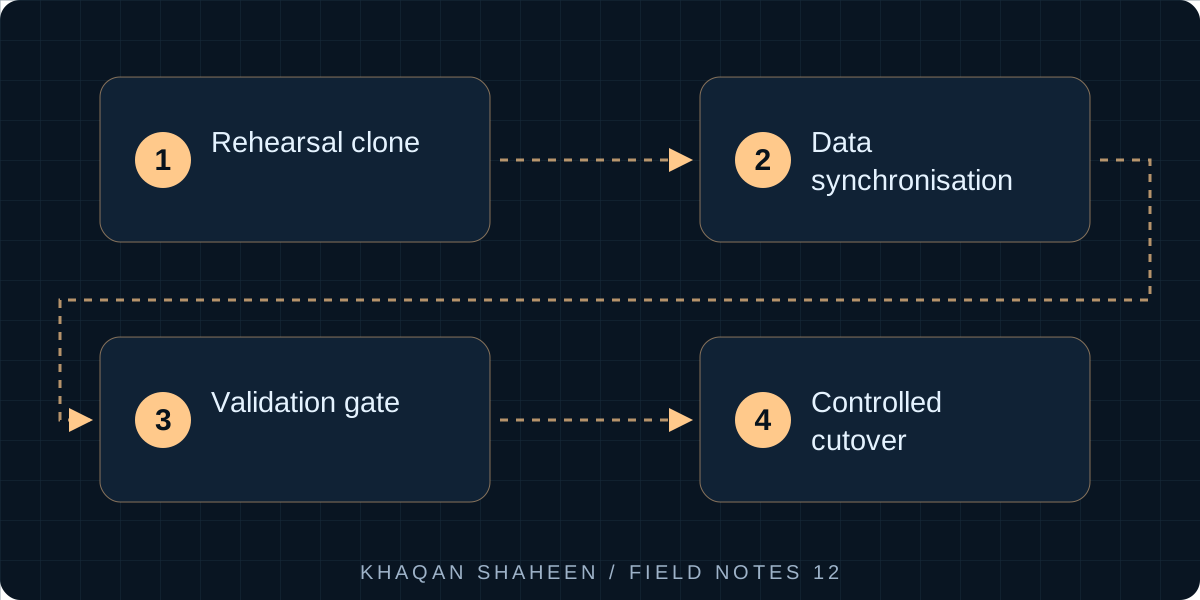
- 01Rehearsal clone
- 02Data synchronisation
- 03Validation gate
- 04Controlled cutover
By the end of this you will be able to plan and run a PostgreSQL major-version upgrade on a database the business cannot do without, choose between pg_upgrade and logical replication with your eyes open, and leave a better recovery position behind you. It is for engineers who own a production database.
What you need
- The old server on PostgreSQL 10 or later (older publishers need the pglogical extension)
- A new server with PostgreSQL 16 installed and network access to the old one
- Spare capacity for a rehearsal clone
- Superuser on both databases, root on both hosts
- A list of every application that writes to the database
Two ways to do it
pg_upgrade rewrites the system catalogue in place and, in --link mode, hard-links the data files instead of copying them, so a large database upgrades in minutes. It runs on one host with both sets of binaries installed and needs a window with the application stopped. Once the new cluster starts after a link-mode upgrade, the old one cannot be started again; the way back is a backup. Run pg_upgrade --check first, every time, and vacuumdb --all --analyze-in-stages afterwards, because planner statistics are not carried over. On Debian and Ubuntu the pg_upgradecluster wrapper drives it.
Logical replication streams row changes from the old server to a new one, which can be on different hardware, a different operating system and a different major version. The application keeps running while the new server catches up, and the cutover is a connection-string change measured in seconds. The price is what it does not do. Every replicated table needs a primary key or a REPLICA IDENTITY, or updates and deletes on it fail on the publisher. It copies data, not schema, and it does not replicate sequences, DDL or large objects, so sequences are copied by hand at cutover and schema changes are frozen for the whole window.
When the database is what the whole business runs on, and the sites using it span time zones so there is no quiet hour, logical replication earns its extra effort. The rest of this is that runbook.
The runbook
1. Audit tables without primary keys
Run this on the old server. Anything it returns gets a primary key, or ALTER TABLE ... REPLICA IDENTITY FULL as a slower fallback.
SELECT n.nspname, c.relname
FROM pg_class c
JOIN pg_namespace n ON n.oid = c.relnamespace
WHERE c.relkind = 'r'
  AND n.nspname NOT IN ('pg_catalog', 'information_schema')
  AND NOT EXISTS (SELECT 1 FROM pg_index i
                  WHERE i.indrelid = c.oid AND i.indisprimary)
ORDER BY 1, 2;
2. Audit extensions and collation versions
SELECT extname, extversion FROM pg_extension;               -- old server
SELECT name, default_version FROM pg_available_extensions;  -- new server
Every extension in the first list must appear in the second. Collation is the quieter risk: sort order comes from the C library, and a newer glibc can order accented and mixed-case strings differently. Logical replication builds every index fresh on the new server, so nothing is corrupted, but ORDER BY may change for the same names. With pg_upgrade onto a new host, reindex every index on text columns. PostgreSQL 15 and later records datcollversion in pg_database and warns on a mismatch.
3. Prepare the publisher
On the old server, wal_level must be logical, which needs one restart: the only planned interruption before cutover, so schedule it.
ALTER SYSTEM SET wal_level = 'logical';
ALTER SYSTEM SET max_replication_slots = 10;
ALTER SYSTEM SET max_wal_senders = 10;
-- restart, then:
CREATE ROLE upgrade_repl WITH REPLICATION LOGIN PASSWORD '...';
GRANT SELECT ON ALL TABLES IN SCHEMA public TO upgrade_repl;
CREATE PUBLICATION upgrade_pub FOR ALL TABLES;
Add a pg_hba.conf line for the new server's address against the database itself, not the replication pseudo-database. Logical replication connects like an ordinary client.
4. Prepare the subscriber
Copy roles and schema using the new server's pg_dump against the old one (a newer pg_dump reads an older server), then subscribe. The subscription creates a slot on the publisher and starts the initial copy of every table.
pg_dumpall -h old-db -U postgres --globals-only | psql -h new-db -U postgres
pg_dump -h old-db -U postgres --schema-only --no-publications --no-subscriptions erp \
    | psql -h new-db -U postgres erp
CREATE SUBSCRIPTION upgrade_sub
    CONNECTION 'host=old-db dbname=erp user=upgrade_repl password=...'
    PUBLICATION upgrade_pub;
For a large database, raise max_sync_workers_per_subscription on the subscriber first.
5. Monitor the lag
On the subscriber:
SELECT srrelid::regclass, srsubstate
FROM pg_subscription_rel WHERE srsubstate <> 'r';   -- empty when the copy is done

SELECT subname, received_lsn, latest_end_lsn, last_msg_receipt_time
FROM pg_stat_subscription;

SELECT subname, apply_error_count, sync_error_count
FROM pg_stat_subscription_stats;                     -- should stay at zero
On the publisher, the slot's lag in bytes:
SELECT slot_name, active,
       pg_size_pretty(pg_wal_lsn_diff(pg_current_wal_lsn(), confirmed_flush_lsn)) AS lag
FROM pg_replication_slots;
One warning from experience: an unconsumed slot holds WAL forever and fills the old server's disk. If you abandon the exercise, drop the slot.
6. Rehearse on a clone
Restore a backup of production to a spare machine and run the whole sequence from it to a throwaway PostgreSQL 16, timing every step. Then point a copy of the application at the result and use it through the real workflows: orders, manufacturing, invoices, the slowest reports. A heavily customised application is where major-version changes bite: query plans move, deprecated behaviour disappears, and each of those is cheap to find on the clone and expensive to find live. Rehearse the rollback too.
7. Freeze the application
At the agreed time, stop everything that writes: the application server and its workers, its scheduler, integrations, reporting jobs, any script anyone ever set up. Then confirm:
SELECT usename, application_name, client_addr, state
FROM pg_stat_activity WHERE datname = 'erp';
Anything still connected that is not you or the replication role gets found now, not later.
8. Wait for lag zero, then copy the sequences
Run the slot query from step 5 until the lag is zero and stays there. Then copy the sequence values, which replication never touched:
SELECT format('SELECT setval(%L, %s, true);',
              format('%I.%I', schemaname, sequencename), last_value)
FROM pg_sequences
WHERE last_value IS NOT NULL;
psql -h old-db -At -f copy_sequences.sql erp | psql -h new-db erp
Do this after the freeze and lag zero, never before; a sequence set too low produces duplicate key errors on the first insert after cutover.
9. Switch, analyse, and open the doors
Detach the subscription, build planner statistics, then change the application's connection string and start it.
ALTER SUBSCRIPTION upgrade_sub DISABLE;
ALTER SUBSCRIPTION upgrade_sub SET (slot_name = NONE);
DROP SUBSCRIPTION upgrade_sub;
-- on the old server:
SELECT pg_drop_replication_slot('upgrade_sub');
vacuumdb -h new-db -U postgres --all --analyze-in-stages
Run the rehearsal's checks again before telling users.
10. Keep the old server read-only for a rollback window
Do not switch the old server off. Lock the application role out, make it read-only, and leave it for an agreed period.
ALTER ROLE erp_app NOLOGIN;
SELECT pg_terminate_backend(pid) FROM pg_stat_activity WHERE usename = 'erp_app';
ALTER SYSTEM SET default_transaction_read_only = on;
SELECT pg_reload_conf();
Rolling back inside that window means pointing the application at the old server and re-keying what was entered meanwhile. If that is unacceptable, set up a reverse publication from new to old before you open the application. It is the only rollback that keeps the data.
11. Rebuild backups, recovery and monitoring
A new server has no backups until you make them, and the migration is the one moment everybody agrees recovery matters.
With pgBackRest: set archive_mode = on and archive_command = 'pgbackrest --stanza=main archive-push %p' on the new server (a restart for archive_mode), then:
pgbackrest --stanza=main stanza-create
pgbackrest --stanza=main check
pgbackrest --stanza=main --type=full backup
The check command proves WAL archiving works end to end, which is the part people skip. Then prove a restore to a chosen moment on a scratch machine:
pgbackrest --stanza=main --delta --type=time \
    "--target=2026-09-08 10:15:00+04" --target-action=promote restore
Plain pg_basebackup plus the same archive_command does the same job with more scripting. Either way, open the application against the restored copy before you call it done. A backup that has never been restored is a hope, not a position.
Then monitoring: alert on pg_stat_archiver.failed_count rising, backup age, disk space on the data and WAL volumes, and transactions open for more than a few minutes.
The checklist
| Phase | Item | Done |
|---|---|---|
| Audit | Tables without primary keys resolved; every writer listed | |
| Audit | Extensions available on the new binaries; collation compared | |
| Prepare | wal_level = logical, role, pg_hba.conf, publication |
|
| Prepare | Schema restored, subscription created, initial copy complete | |
| Rehearse | Runbook and rollback run on a clone, steps timed, application tested | |
| Cutover | Schema frozen, every writer stopped, pg_stat_activity clean |
|
| Cutover | Lag zero and stable, sequences copied | |
| Cutover | Subscription and slot dropped, statistics built, connection string switched | |
| Cutover | Old server read-only, application role locked | |
| After | WAL archiving, pgbackrest check and a full backup passing |
|
| After | Restore proven on another machine, monitoring live, old server retired |
Common questions
Why not use pg_upgrade when it is so much faster?
Use it when you can take the window and are staying on the same host; it is less work with fewer moving parts. Logical replication is for the cases pg_upgrade cannot cover: no acceptable window, new hardware or a new operating system at the same time, or a rollback that must not depend on a restore.
Can I skip the rehearsal if the database is small?
No. The rehearsal is about the application, not the size. A small database under a customised application has the same query-plan changes and extension gaps as a large one, and the clone is where you time the steps that let you promise a window and keep it.
What happens if someone changes the schema during replication?
A column added on one side but not the other stops the apply worker, and the error count in pg_stat_subscription_stats rises. Freeze schema changes for the whole window, application module updates included. If one gets through, apply the same change on the subscriber, then run ALTER SUBSCRIPTION upgrade_sub REFRESH PUBLICATION to pick up new tables.